Book Demo
CREATACRM MOBILE

CRM, sales & warehouse on your phone

CreataCRM Mobile puts your CreataCRM workspace in your pocket. Manage customers, close sales, run jobs, and handle warehouse fulfilment — then tailor the app so each role only sees what they need.
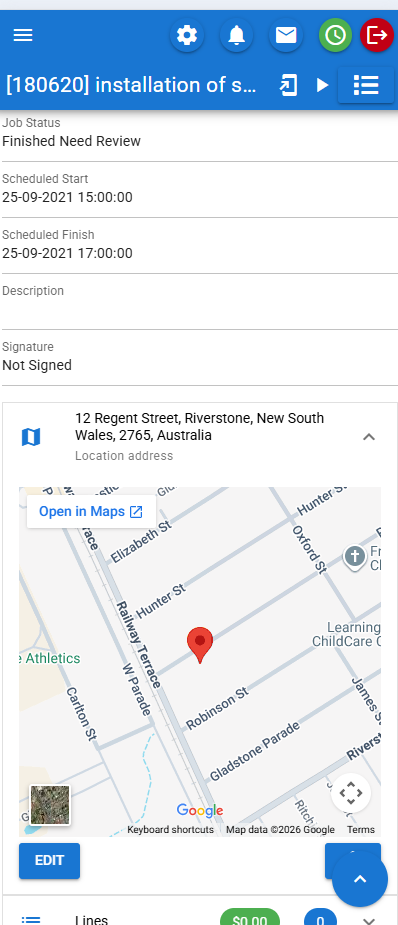
CreataCRM Mobile app on iPhone

Sales teams

Leads, quotes, orders and invoices from the field or the counter.

Warehouse staff

Pick, pack, ship, receive stock and scan barcodes on the floor.

Field & job crews

Jobs, timers, photos, signatures and customer calls on site.

Managers

Dashboards, calendars and the same live CreataCRM data everywhere.

Creata Assistant

Ask CreataCRM in plain English — tap results to open records.

Built for how you sell

Leads → quotes → orders → invoices, all from the mobile app.

Orders to invoice

Interactive shopfront ordering for field sales on the road.

Warehouse-ready

Pick, pack, ship, receive stock and barcode scan on your phone.

Field & jobs

Schedule work, clock time, capture photos and manage tickets.

Your menu, your layouts

Customise for warehouse sales, counter sales or service teams.

Connected accounting

Link customers and documents with Xero, MYOB and Reckon.

One CRM everywhere

Same CreataCRM data on phone and desktop — one connected system.

CREATA ASSISTANT

Ask CreataCRM. Get answers on your iPhone.

Creata Assistant lets you ask about customers, tasks, jobs, quotes, sales orders, and invoices in plain English. Get clear results you can tap — and open the record without hunting through menus.

Ask what you’re chasing today

  • Show active customers, tickets, and today’s activities
  • My open tasks, opportunities, and quotes
  • Jobs due today and unpaid invoices
  • Tap any result to open it in CreataCRM Mobile
Show active customers Show my open tasks What jobs are due today? Show my open quotes List unpaid invoices Show my open opportunities

Start with a tap — or ask in your own words.
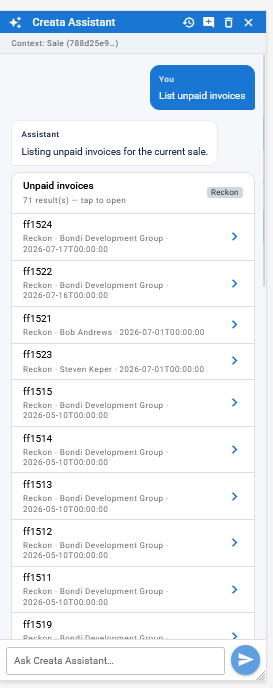
CreataCRM Mobile — Creata Assistant chat with suggested prompts and tap-to-open results

Same CreataCRM. Now you can ask it — wherever you are.

CONFIGURE FOR YOUR BUSINESS

Not a fixed generic CRM app.

CreataCRM Mobile is configurable per business and role. Design menus and layouts so warehouse sales, field service or office CRM each see only what they need — the modules you enable, nothing more.
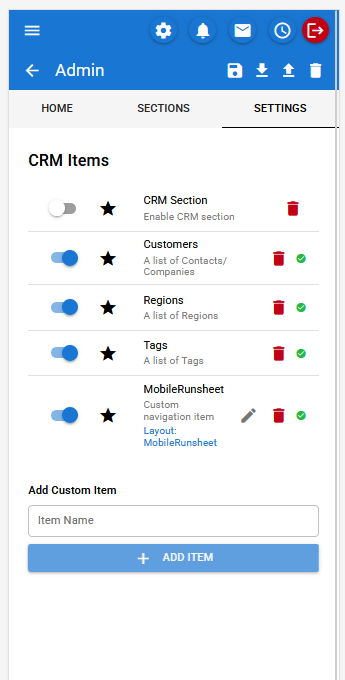
Customise includes

  • Menu Designer — design the mobile menu per user / role
  • Show or hide modules by role (CRM, Sales, Jobs, Warehouse, Admin, accounting plugins)
  • Custom navigation items and sections for your business
  • Configurable layouts with cards, lists, tables, charts, filters, buttons, modals and maps
  • Shopfront — product browse and cart for counter / warehouse-style sales
  • Custom workflows via actions and detail views
CreataCRM Mobile Menu Designer — enable CRM items and add custom navigation

Menu Designer — turn modules on/off and add custom items per role

CRM

Customers, activities and team updates on the go.

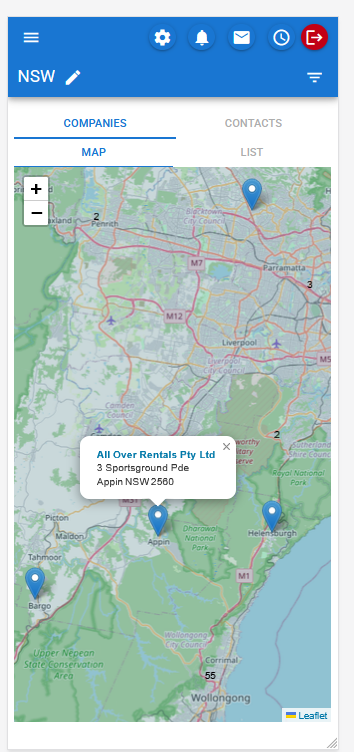
Keep customer context with you — companies, contacts, regions, calendar and notifications in the same CreataCRM system your team uses at the desk.
CRM features

  • Customers — companies and contacts
  • Regions with map-based views
  • Tags, activities and notifications
  • Calendar / What’s On — today and upcoming
  • Team posts and mentions
CreataCRM Mobile — companies map view with customer locations
SALES — PIPELINE

Manage leads and opportunities for your business

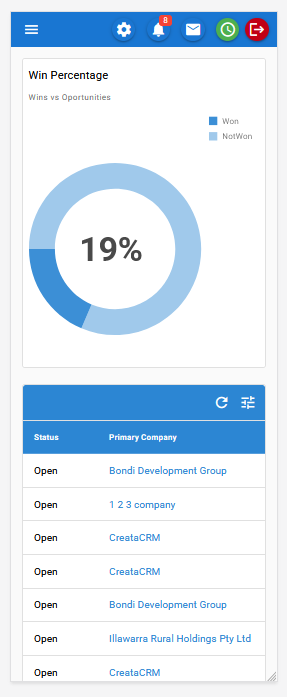
Interactive dashboards show how your pipeline is performing — like win rate against open opportunities — while leads and opportunities stay in your pocket. Follow up, change stages, and keep deals moving without waiting to get back to the desk.
Leads & opportunities

  • Interactive dashboards for sales performance
  • Manage leads and opportunities on mobile
  • Follow up opportunities with stage changes
  • Filter and review open opportunities by company and status
  • Email follow-ups from the app
CreataCRM Mobile — interactive win percentage dashboard and open opportunities list

Interactive dashboards and opportunity follow-up

From following up opportunities, to taking the order and invoicing — CreataCRM Mobile covers the full sales journey on the phone.

SALES — FIELD ORDERS

Manage orders to invoice

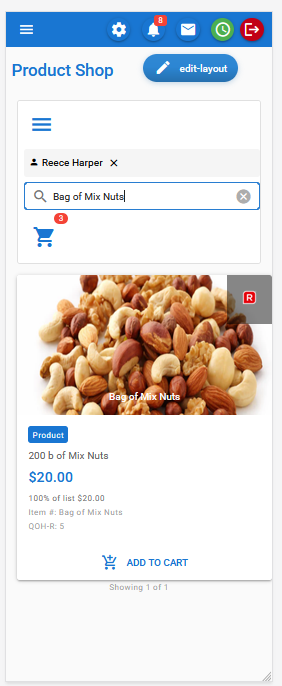
Built for sales field agents taking orders with an interactive order system. Handle quotes and orders on the road, apply the right price list, build the order with shopfront / order-box style product entry, and move through to invoice — all in CreataCRM Mobile.
Orders to invoice

  • Interactive ordering for field sales agents
  • Take and manage orders on the road
  • Support for different customer price lists
  • Order box / shopfront product browse and cart
  • Quotes → sale orders → invoices
  • Cash / quick sale invoicing when you need to close fast
CreataCRM Mobile — Product Shop order box with customer and cart

Interactive order box & shopfront ordering

WAREHOUSE & INVENTORY

Run fulfilment from your phone.

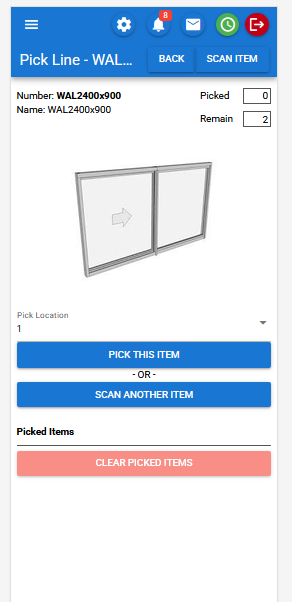
Pick, pack and ship open sales, receive purchase orders, manage products and suppliers, and scan barcodes — warehouse workflows designed for the floor.
Warehouse features

  • Products, services and suppliers
  • Purchase orders and open POs waiting to receive
  • Pick / Pack / Ship for open sales
  • Receipts — receive products from purchase orders
  • Barcode scanner — scan and assign barcodes to products
  • Fulfilment and carton detail flows
CreataCRM Mobile — warehouse pick line with barcode scan
JOBS & FIELD WORK

Schedule, clock time and close jobs on site.

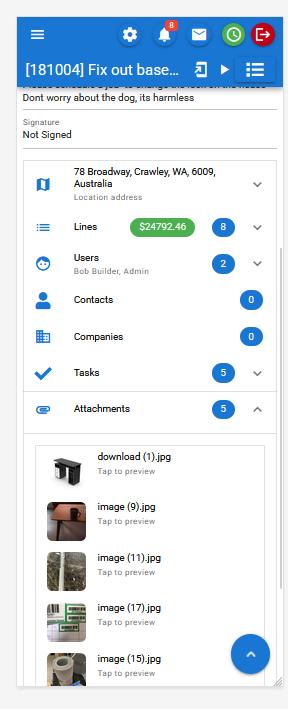
Field teams can open jobs, capture photos and signatures, call customers and log time — with calendar visibility across bookings, activities and timesheets.
Jobs features

  • Jobs, tasks, projects and tickets
  • Job items, attachments and assigned users
  • Calendar for jobs, bookings, activities and timesheets
  • Time clock / timers and timesheet entries
  • Camera / photo capture and signature capture
  • Call customers from the device
CreataCRM Mobile — job detail with timer, attachments and signature

Jobs on site — clock time, photos and sign-off

ACCOUNTING INTEGRATIONS

Connected to the systems you already use.

CreataCRM Mobile works with your CreataCRM accounting links — so contacts, invoices and related documents stay connected in one place.

Xero MYOB Reckon

Xero

Contacts and invoices linked in CRM.

MYOB

Invoices and quotes connected to your workflow.

Reckon

Invoices, estimates, buyer behaviour and orders.

ONE SYSTEM

Same CreataCRM everywhere.

CreataCRM Mobile is not a separate product silo. It connects to the same CreataCRM system your business already runs — CRM, sales, warehouse, jobs and accounting integrations.

Dashboards and admin tools stay permissions-aware, so each user sees the menus and modules their role allows.

Also included

Ready to put CreataCRM on your phone?

Talk to us about CreataCRM Mobile for your sales, warehouse or field team. We’ll show you how menus and layouts can match the way your business works.

Contact Us Explore CreataCRM

Existing customers: For help inside the product, use Support in CreataCRM or contact your Champion. For new enquiries and demos, use Contact Us.