Website Lead
Capture enquiries from website forms and webhooks.

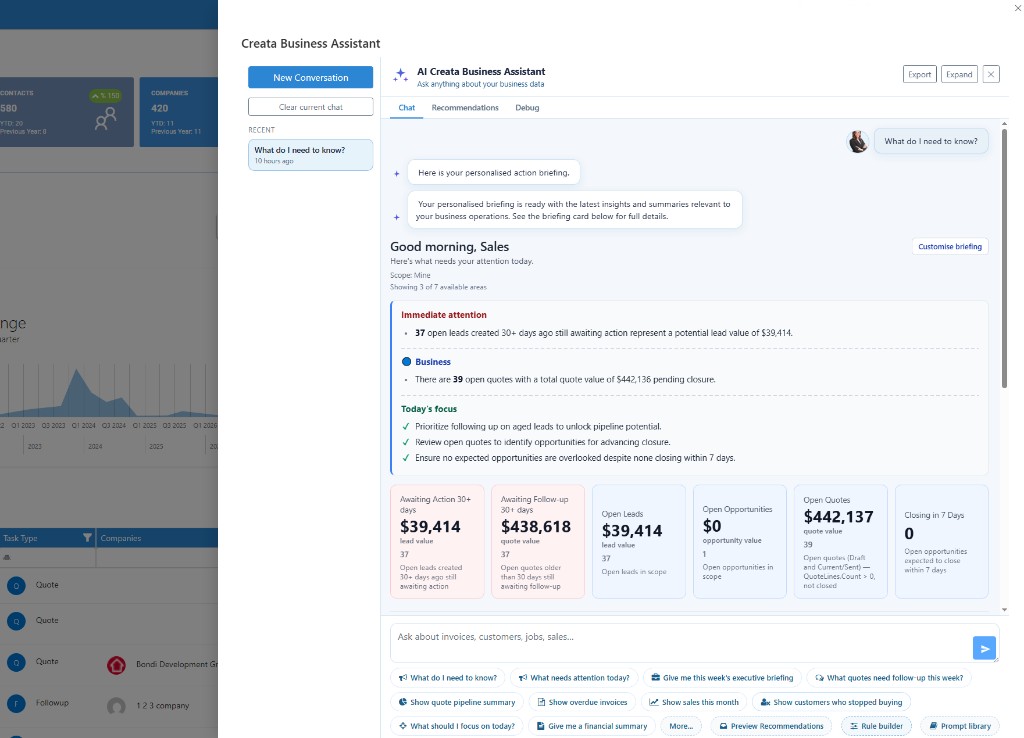
CreataCRM AI reviews your customers, leads, opportunities, quotes, sales orders, jobs and overdue work, then builds a personalised action briefing so you know where to focus first.
No searching. No guessing. Just the highest-impact actions for today.
Built for Australian businesses using MYOB, Xero and Reckon.
CreataCRM connects each stage of the sale so your team does not need to re-enter customer, product or transaction information.
Capture enquiries from website forms and webhooks.
Qualify interest and assign ownership.
Qualify the deal and track the next action.
Create, send and obtain customer approval.
Authorise the sale and prepare fulfilment.
Fulfil stock or deliver the work on site.
Bill deposits, progress or the full balance.
Send through to MYOB, Xero or Reckon.
When a prospect submits a website form, CreataCRM can create the lead, assign the right salesperson, schedule the next action and notify your team automatically — no coding required.
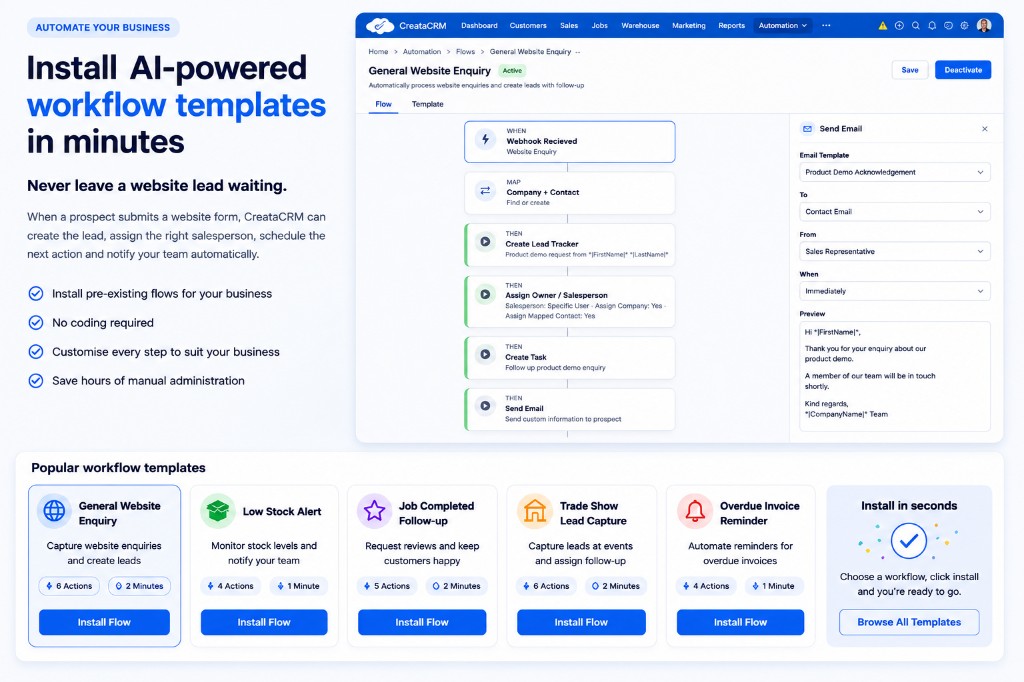
Install ready-made flows — or customise every step for your process.
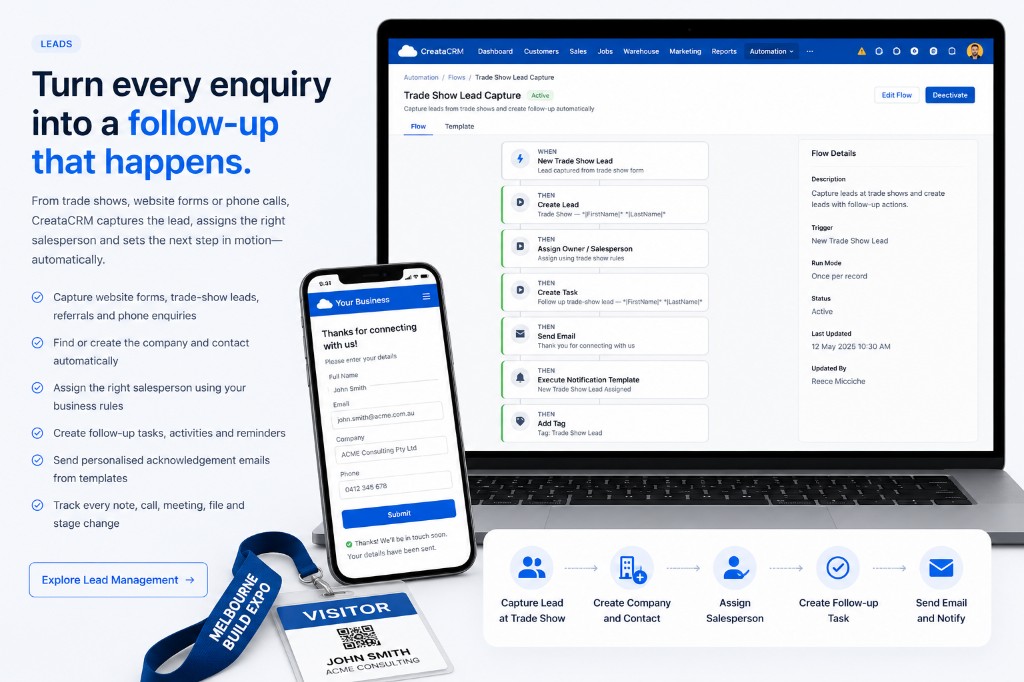
Whether a lead comes from your website, a phone call, a referral or a busy trade show, CreataCRM captures the details, assigns the right salesperson and makes sure the follow-up is already organised before the opportunity goes cold.
A visitor submits their details. CreataCRM creates the company and contact, opens the lead, assigns the salesperson, creates the follow-up task, sends the acknowledgement email and notifies the team automatically.
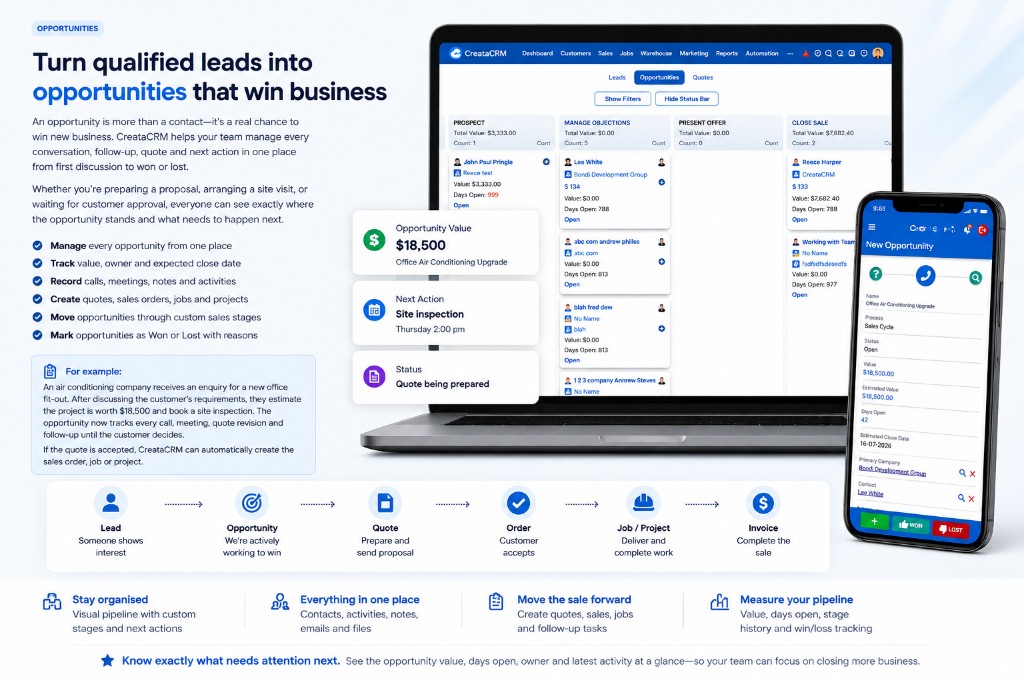
Once a lead becomes a genuine sales opportunity, CreataCRM helps your team stay organised from the first conversation through to the final decision.
Whether you're preparing a proposal, arranging a site visit, negotiating pricing or waiting for customer approval, every email, meeting, note, quote and next action is kept together so nothing gets missed.
With CreataCRM you can:
Creating a quote is only the beginning. CreataCRM keeps your entire sales process connected, helping your team move from customer approval to completed work without re-entering the same information.
When a quote is accepted, you can continue the process by creating a sales order, scheduling the job, generating invoices and recording payments—all from the same sale.
Whether you're selling products, delivering services or managing projects, every document, activity and customer interaction stays together in one place.
A fire protection company receives a request to replace safety equipment in a commercial office. The salesperson prepares and emails a professional quote from CreataCRM. The customer reviews the quote online, approves it and pays the required deposit through the integrated payment gateway.
With just a few clicks, the accepted quote becomes a sales order. The installation job is scheduled, technicians complete the work, the final invoice is generated and the remaining balance is paid. Every stage—from the first quote through to the final payment—is tracked in a single connected workflow.
Everything stays connected
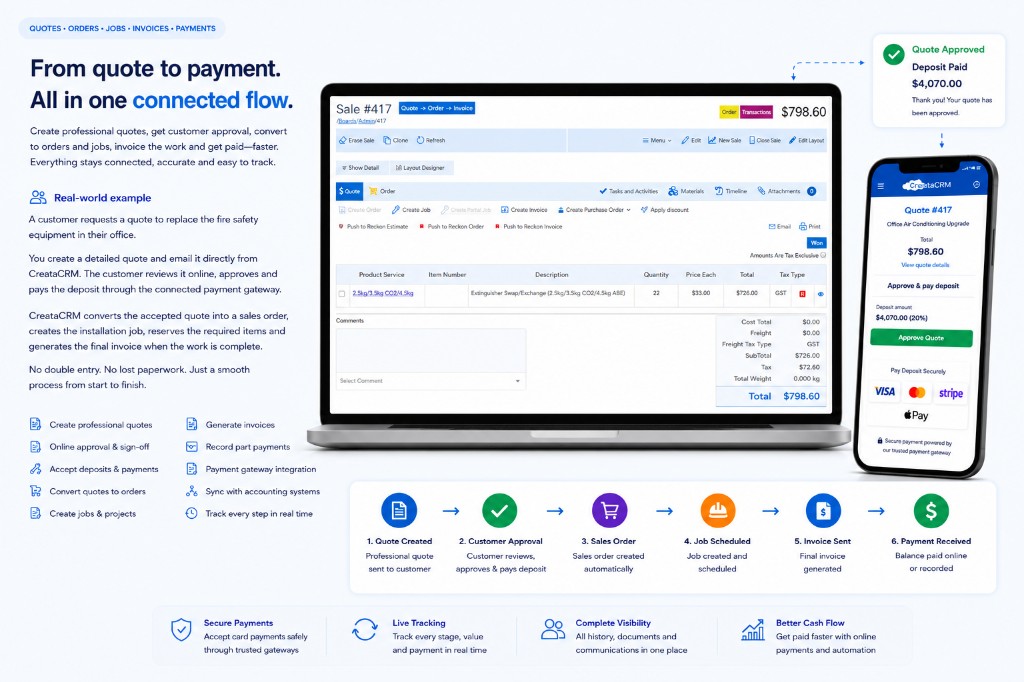
One connected workflow from your first proposal to getting paid.
CreataCRM sales orders take you from quote to authorised order, stock commit and reserve, pick–pack–ship, backorders, and invoice, PO or job creation — without re-keying the sale.
Configure the pipeline for how you sell: turn Quote, Order, Fulfilment, Invoice, Job, Purchase Order and Opportunity on or off per sale type.
A customer orders 22 fire extinguishers. You have 14 in stock and 8 short. The team authorises the order, reserves available stock, picks and ships 14 today, and creates a backorder for the remaining 8. When the new stock arrives, fulfilment continues and the final invoice is generated — all from the same connected sale.
What your team can do
Reserve stock, create fulfilments, pick, pack and ship using locations, barcodes and lot or serial tracking.
Explore Warehouse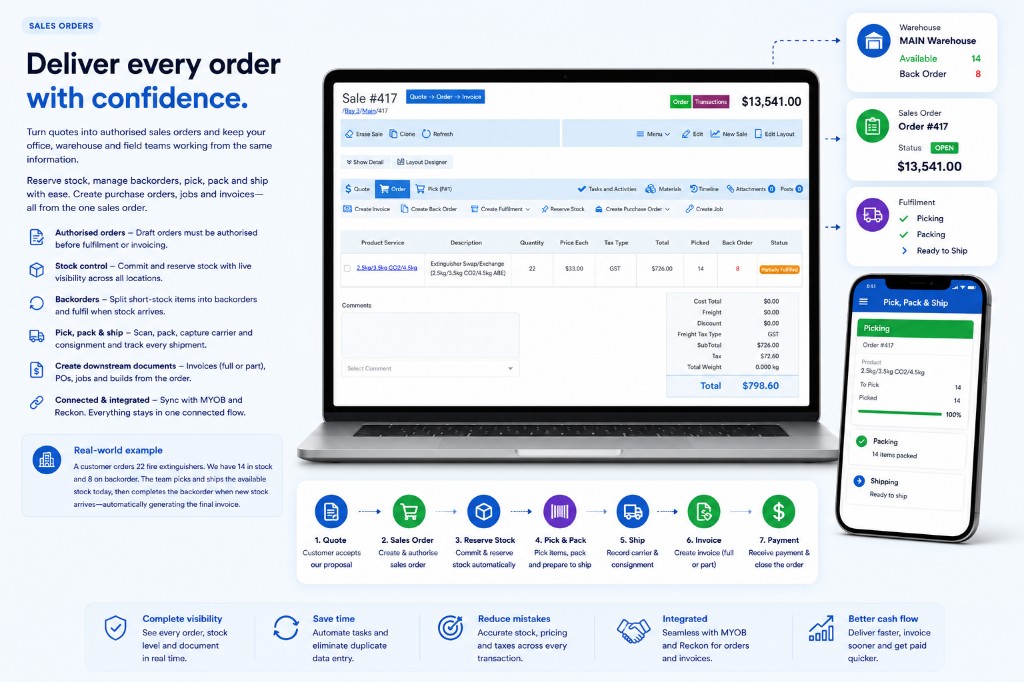
One order. Stock, fulfilment and invoicing stay connected.
Create jobs directly from opportunities, quotes or sales orders with the customer, delivery details and product lines already connected.
From sale to site, without re-keying
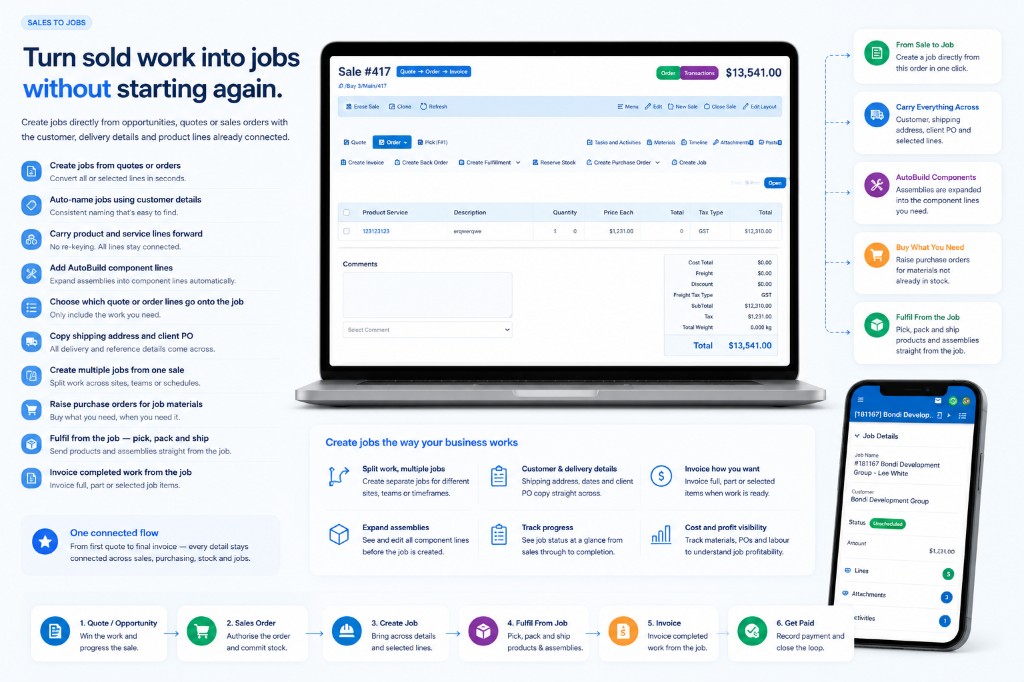
Sold work becomes a job with the details already connected.
Control products, services, bundles, order quantities and customer pricing from one connected catalogue.
Customer-specific pricing and global rules.
Filter products, control visibility and email price books to customers.
Add groups of products and customise the sale lines when requirements change.
Set units of measure and minimum, default and maximum ordering quantities.
Create invoices from quotes, orders or jobs in CreataCRM, then send the transaction to MYOB, Xero or Reckon while retaining the full sales history in CreataCRM.


Supported features can differ by accounting platform. Your demonstration will show the connectors relevant to your business.
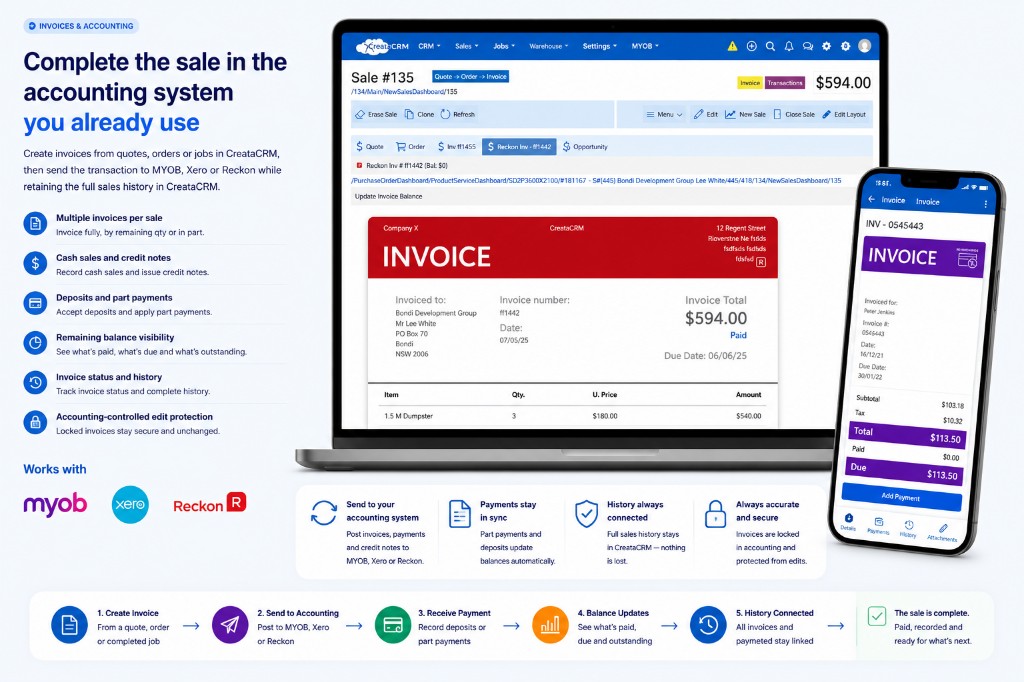
CreataCRM runs the sale; MYOB, Xero or Reckon holds the accounting document — invoices, payments and balances stay linked without losing Creata history.
Use plain English to find sales information, understand what requires follow-up and prepare the next action for review.
Actions remain reviewable and can require confirmation before execution. Creata Assistant supports your team — it does not run fully autonomous sales.
Build no-code workflows that respond to stage changes, statuses, tags, schedules and website events.
Opportunity status changes
Status equals Won
Create onboarding task
Send confirmation email
Notify the job team
Choose the combination of opportunities, quotes, orders, fulfilment, invoices, jobs and purchase orders that matches your business.
Sales, jobs, warehouse, purchasing and accounting work from the same connected customer and transaction information.
Ask questions, identify follow-ups and automate repeatable sales processes.
Work with a local team that understands Australian businesses and accounting platforms.
Book a personalised demonstration using your typical lead, quote, order and fulfilment workflow.